 During many years of working with backup systems in various environments, I have repeatedly encountered a fairly specific, though seemingly mundane problem: how to restore data to hosts where we don’t have a backup agent, credentials, or open network traffic? How to securely share it with end users? I decided to deal with this problem once and for all by creating the Bakdrop application.
What exactly is the problem with restoring files?
First, let’s explain how data restoration in backup systems usually looks. As a rule, entire virtual machines or their disks are restored (from snapshot backup) or individual files (in the case of agent-based backup). In most systems, it is also possible to restore data from a snapshot backup in the form of files from inside the virtual machine, the same as in the case of agent-based backup.
In the case of machines with an installed backup system agent, the situation is clear: we simply restore data to any location on the host. But what about machines that don’t have such an agent?
In most environments where I’ve worked, backup is done via snapshots, meaning entire virtual machines are backed up. So there’s no reason to install an agent on them. In most cases, restore comes down to restoring the entire virtual machine or a single disk that is attached to an existing VM.
Sometimes, however, there is a need to restore only specific files or directories, not the entire machine. However, for them to land on the target host, the backup system must have access to its OS, meaning it needs an agent there. Some systems, such as Commvault, also allow you to recover files to a machine without an agent - but this has many limitations (VMware only, files smaller than 10 GB, need to provide credentials).
Someone might ask - if so, what’s the problem with installing an agent on all virtual machines just for the purpose of possible file restoration? For example, Commvault allows installation of agents in restore only mode - they don’t consume licenses then. This is a perfectly valid approach, but not without drawbacks. First, for various reasons not everyone wants such an agent on their servers. Second, in network-isolated environments, it’s necessary to open traffic to/from each machine. Third, the matter of scale. In a small environment of a dozen or so machines, this won’t be a problem, but when there are hundreds or thousands of machines, it won’t be either simple or convenient to manage.
So what do you usually do when you don’t have an agent on a machine? You restore “somewhere on the side” and then “somehow” share it with the target user.
And this is exactly point of the problem. Because what does “somewhere” mean? From experience, I know that usually it’s the backup server itself or another host where data is thrown “for a moment” and then copied via SMB, NFS, SCP, or any other method.
However, this is - to put it mildly - a very imperfect approach. It’s particularly bad to use any backup infrastructure machine as a stage (main server, proxy, media agents). Backup infrastructure should be maximally network-isolated from everything else. So it shouldn’t be able to send anything, and even more so - share anything with other hosts.
Okay, to avoid this, we can create a dedicated host to which we restore data and from which we will share it with end users. But how? Personally, I tried with SMB. However, it was very problematic because, for obvious reasons, it couldn’t be a resource without authentication. I created several shares, then sent access credentials and passwords as needed. However, it was necessary to change these passwords each time to be able to reuse the shares. You also had to remember to delete the data, and not every user could handle connecting to an SMB resource. Administrative nightmare.
There’s also another problem - files lying forgotten for weeks or months. After all, you, as the backup admin, must ensure they are deleted immediately after being copied by the target user. It’s easy to imagine a situation where someone didn’t let you know that files can be deleted from the resource, and you forgot about them. Such a circumstance may be undesirable even from the point of view of legal regulations.
I thought that the best solution would be simply to provide a one-time link to download files, something like WeTransfer, only self-hosted. I started searching and came across solutions such as PicoShare, GoKapi, or FileBrowser. Many of them are really great projects, but ultimately they weren’t quite suitable for my intended use - they were either overkill, or didn’t independently detect files in a given directory (only those uploaded through the interface), and didn’t have the option to delete a file after sharing. So I decided to create such an application myself.
Bakdrop - application for sharing restored data
The application’s assumptions were quite clear:
- The simplest possible form, minimalist interface and only essential functions,
- Admin interface allowing creation and deletion of links and data deletion,
- Link in the form of a random string of characters,
- Automatic reading of files from a specified location on the server,
- Ability to set automatic deletion of shared file after download,
- Support for arbitrarily large files and automatic zipping of folders when downloading,
- Possibility to download by direct link.
Since I have some experience with PHP, that’s the language the application is being created in. Plus a simple SQLite database to store configuration and link data.
Currently (end of May 2026) the application is already stable and works without problems, final touches, tests, documentation remain, and I will soon release the first official release. If you’d like to test it now, you can download it from Github, where you’ll also find installation instructions.
How Bakdrop is built
If you’re curious about technical details, below is the application structure with descriptions of the most important files.
├── api.php            // main application functions
├── assets
│   ├── logo.png
│   └── style.css
├── auth.php           // user authentication
├── composer.json      // file for downloading zipstream library
├── config.php         // configuration file to complete
├── db.php             // database handling functions
├── download.php       // file downloading
├── helpers.php        // various helper functions used in other scripts
├── index.php          // admin panel
├── lang               // translation files
│   ├── en.json
│   └── pl.json
├── setup.php           // first configuration wizard
├── share.php           // sharing link handling
├── vendor
└── views               // separated HTML views
    ├── auth.view.php
    ├── index.view.php
    ├── setup.view.php
    └── share.view.php
As you can see, it’s not overly complicated. Part of the code is separated for clarity - all repeating functions ended up in helpers, and HTML was extracted into views to make it easier to edit. I also introduced language support - handling a new language comes down to creating a new json and adding its handling in the code by editing one line.
Requirements and installation
For the application to work, you need a web server (Apache, nginx), PHP version 8.3+, and Composer (needed to install the ZipStream library).
Installation as Docker is also possible, then you just need Docker + Docker Compose. In the case of Docker, you should also grant appropriate permissions for the www-data group to the directory where files to be shared will be stored.
More details about installation and configuration can be found on the project’s Github.
As for the Bakdrop server itself in the infrastructure, it must of course have our backup agent installed and, if necessary, appropriate network ports open (incoming 443/TCP from all endpoints - the application is available via HTTPS, and ports appropriate for the given backup system).
General workflow for data restoration with Bakdrop
First, the admin restores data to the Bakdrop server to our application’s main directory. Then they log into the admin panel and click “Share”. In the sharing window, they can decide whether to set link expiration, password protection, and file deletion after download. After creating the link, they pass it to the end user. The user simply opens it in a browser, enters the optional password, and downloads the file (or folder - then it will automatically be downloaded as a zip). The simplest way to explain this will be with a diagram.
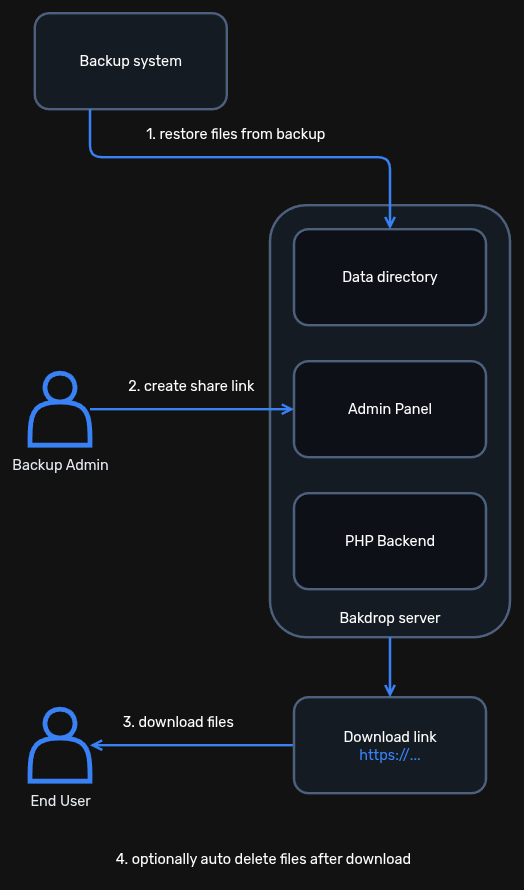
In my opinion, such an approach is optimal in terms of security - users download their files themselves, their hosts don’t interact with the backup system in any way, files exist in the staging location only for a moment - until they are downloaded.
Interface
The assumption of the admin interface was maximum simplicity and intuitiveness. The first section displays a list of files existing in the configured directory. Below is a list of active sharing links. Below are screenshots presenting the application.
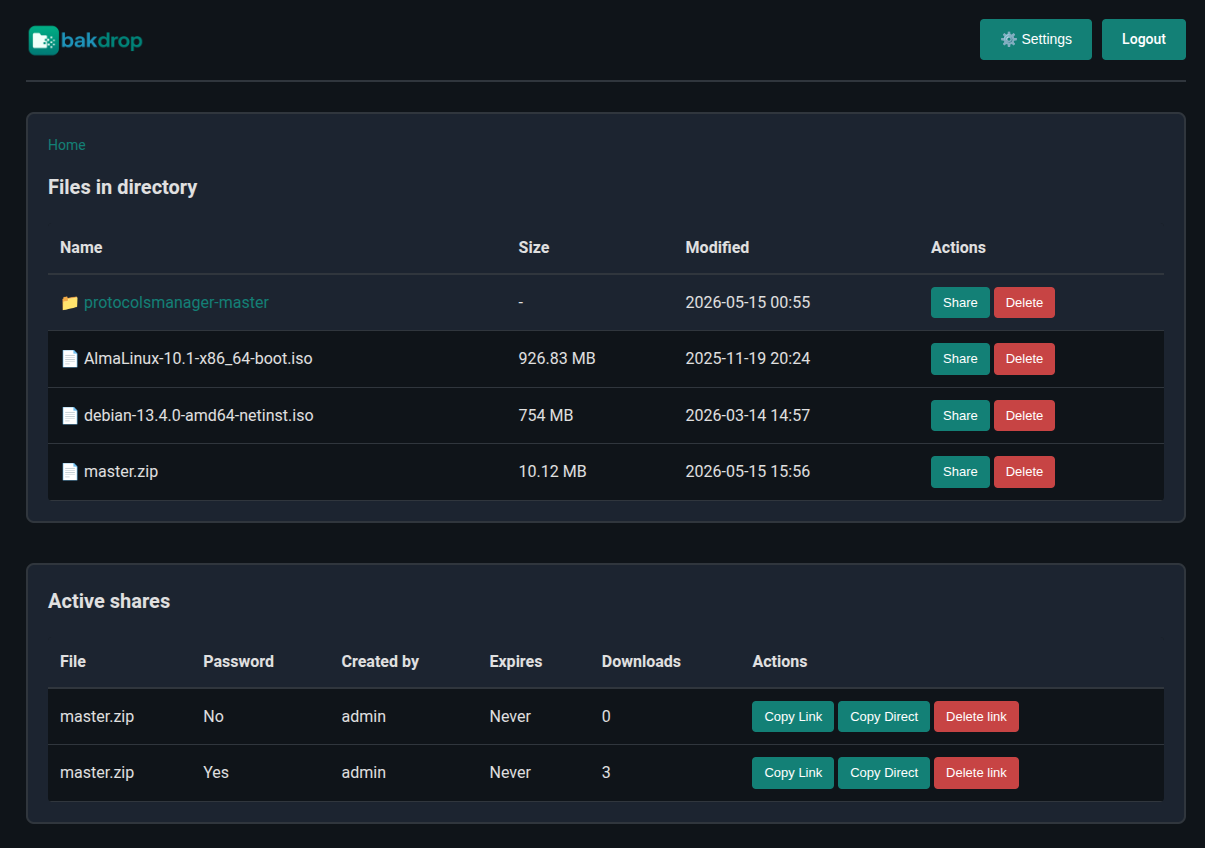
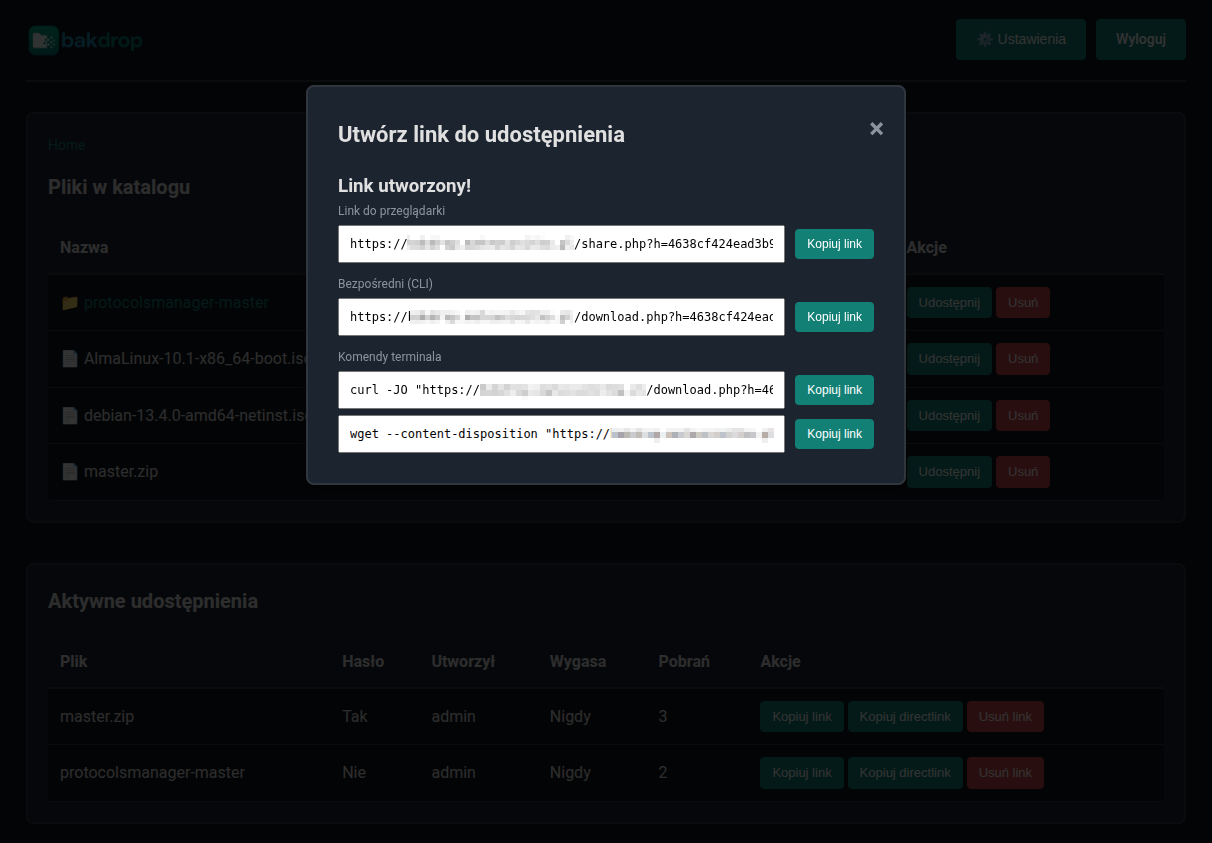
File sharing screen:
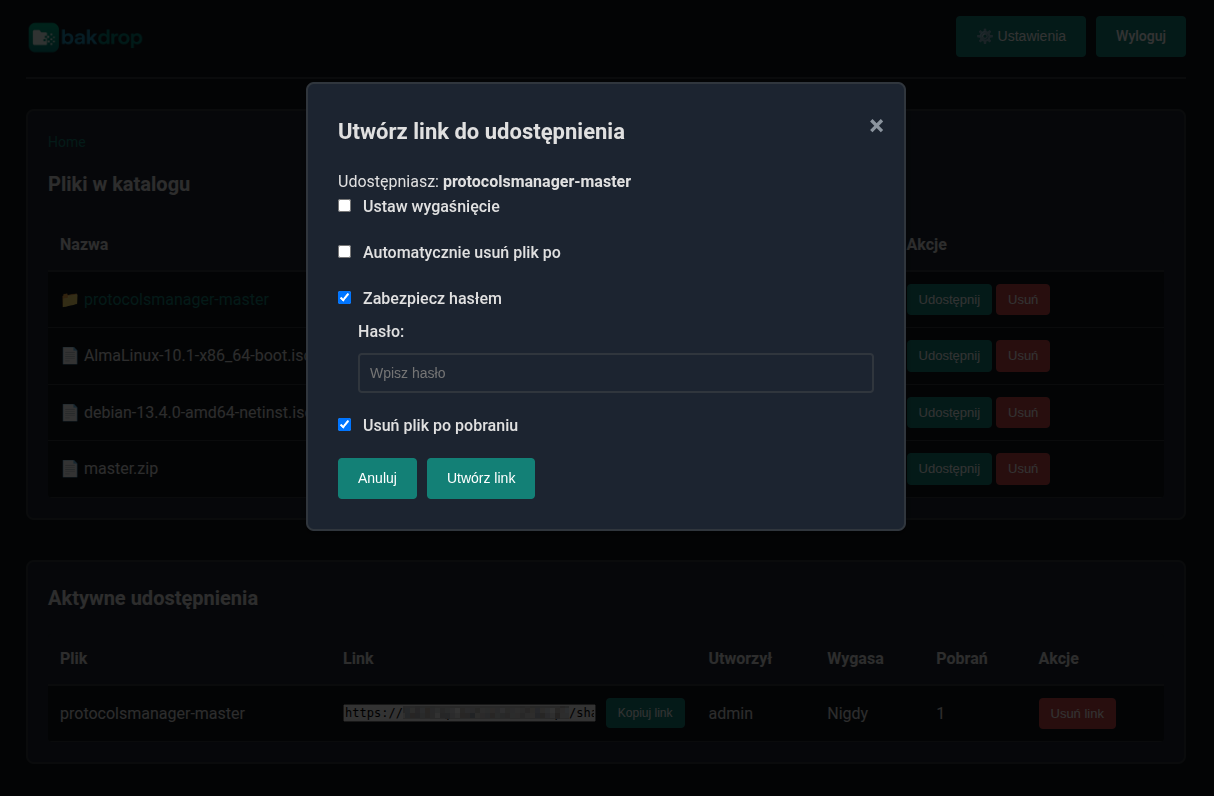
Screen showing links to copy after submitting share. As you can see, you can use browser link and direct link. Also there are ready to use curl and wget command below to use in terminal / command line.
This is what a link opened by an end user looks like:
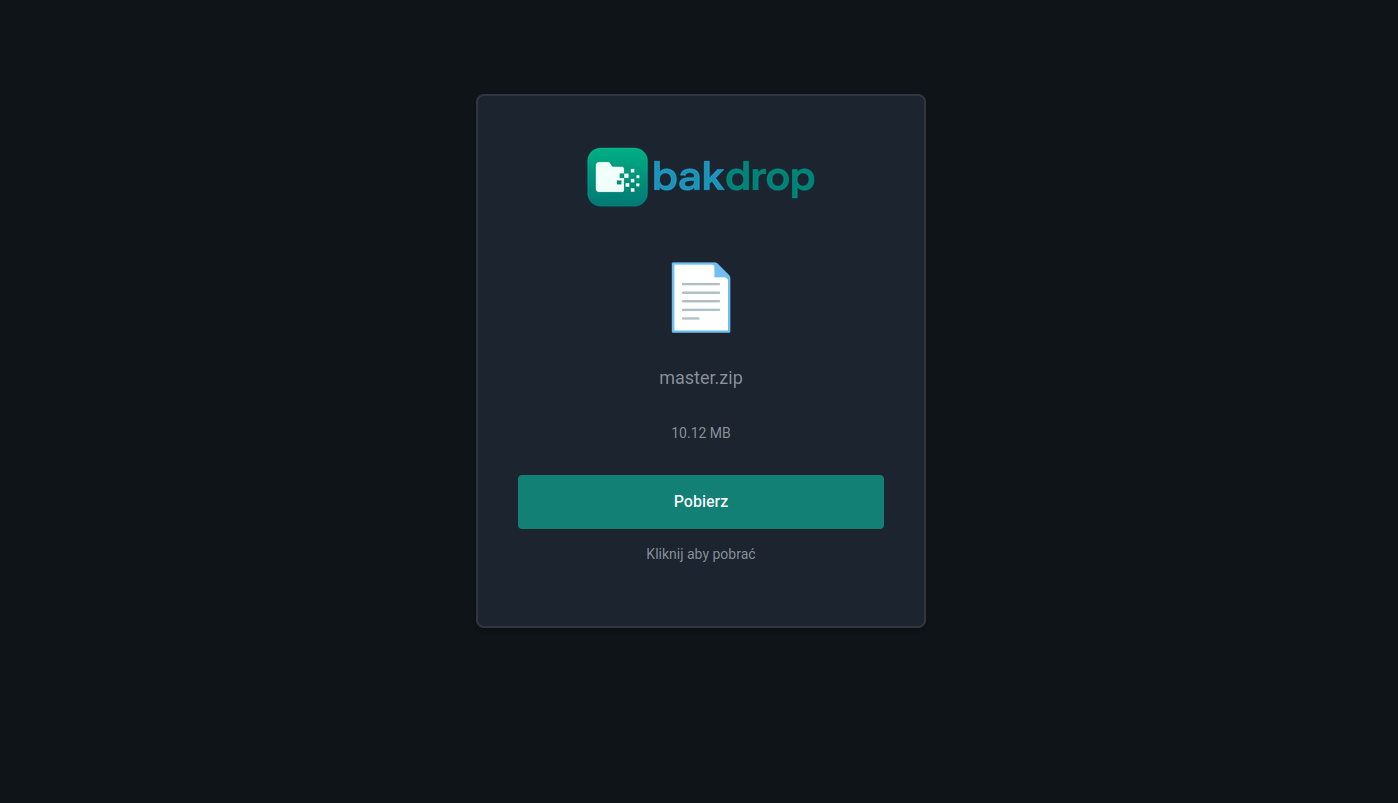 The interface is available in Polish and English, we can also change the theme to dark/light.
Other applications
The application was built for a specific purpose, but of course this doesn’t mean that sharing backups is its only use! It can be used anywhere simple file sharing via web is needed - without accounts, permissions, and an excess of unnecessary options. I even use it in my homelab on a server with installers, which I didn’t want to turn into another NAS. Nevertheless, I decided not to implement file upload via web - enough applications have already been created for such uses, such as the mentioned Picoshare or Gokapi, so I don’t see the point in unnecessarily complicating Bakdrop’s code.
Comparison to other solutions
Below is a small comparison of selected features of Bakdrop with other similar solutions. I’ll emphasize that these are also great tools, but simply for different applications.
| Tool | Main use | Delete files after download | Direct server directory reading | Upload via web | Complexity |
|---|---|---|---|---|---|
| Bakdrop | Temporary file sharing (e.g. restored from backup) | Yes | Yes | No | 1/5 |
| Picoshare | Simple web -> web sharing | No | No | Yes | 1/5 |
| Gokapi | More advanced web <-> web sharing | No | No | Yes | 2/5 |
| FileBrowser | File sharing from server | No | Yes | Yes | 3/5 |
| FileBrowser Quantum | File sharing from server | No | Yes | Yes | 4/5 |
Summary
A seemingly mundane problem - which was present in virtually all environments I’ve had contact with - resulted not only in the creation of a new application, but also the development of an entire process approach to data restoration in this specific scenario. It seems to me that such an approach is optimal and has many advantages.
The application itself will continue to be developed by me, and if you find it useful, I encourage testing and sharing feedback. It is distributed under an open-source license (GPLv3), so it can also be used commercially without problems.
FAQ
- Is this another WeTransfer / Nextcloud / Filebrowser / Gokapi?
No, this is a maximally simple application exclusively for sharing files from the server without any “fancy” functionalities.
- Why can’t you add files through the web panel?
Because this is an application exclusively for sharing files existing in a given directory on the server.
- What’s the point of Bakdrop’s existence?
Quick and simple file sharing using expiring links with the ability to delete files directly after download.
- Is Bakdrop free?
Yes, it is an open-source project distributed under the GPLv3 license.
Comments