
It’s Friday evening. You settle comfortably on the couch, turn on the game. Then your work phone rings… and you already know this won’t be a light weekend.
You’ve been encrypted. You receive a ransom note. What do you do? Panic sets in, stress, pressure. Then the first attempts to identify the threat and patch the environment. Eventually, you need to restore from backup. Which brings up the question - do you still have anything to restore from? Will you manage to do it before the company suffers catastrophic losses?
This scenario is not fiction. According to CERT’s 2025 report, it was the reality for nearly 180 Polish companies of every size. How do you avoid such a nightmare? Contrary to what you might think, this is not a question only for admins - it is also a responsibility of the Business side. In this case, the technical and business worlds are inseparably linked.
In this article, we’ll look at modern threats in the context of backups, building a business continuity strategy, and the basics of secure backup system architecture.
Why is backup a completely different challenge today than it was 10 years ago?
A decade ago, we understood backup quite narrowly: simply as a copy just in case - a hardware failure or a user error. It was often just an add-on to admins’ responsibilities, not really considered in the context of the whole company. Today, that approach is far from sufficient. We should now think not so much about backup itself, but about comprehensive data protection as an element of our organization’s operating strategy. So what exactly changed over the last 10-15 years that made the old approach obsolete?
Regulations: data protection is no longer just an IT matter
The GDPR, introduced in 2018, was in a sense a revolution in thinking about data and how it’s protected at various levels. Previously, a hacker attack and data exfiltration could be painful, but now it also comes with legal consequences and potential financial penalties. Cybercriminals know this very well, which is why double extortion attacks are becoming increasingly popular. These involve encrypting files and demanding a ransom not only for their recovery, but also to prevent the data from being published. In that situation, even backups don’t solve the problem, and the company is exposed to far-reaching legal, reputational and financial consequences.
The European NIS2 directive is another important aspect that places responsibility for IT security on companies - or more precisely, on their boards. Even though it doesn’t contain much specific information about backups, it primarily changes how they’re perceived. They’re no longer just a best practice - they’re part of a business continuity policy. It also creates the need to have appropriate procedures and policies in place, because in the event of an incident or an audit, these will be subject to review. Failure to meet requirements can result in serious financial penalties. For essential entities, these can reach up to 10 million EUR or 2% of global annual turnover, while for important entities up to 7 million EUR or 1.4% of turnover. The final amount depends on the category of the entity and the nature of the violation.
Ransomware-as-a-Service and artificial intelligence
A decade ago, ransomware attacks were mostly prepared and executed by programmers - or at least people with extensive IT skills. Today, the bar required to carry out effective attacks has dropped dramatically. There are two main reasons for this - the commercialization of ransomware attacks and the availability of AI tools.
Ransomware attacks have become such an effective tool for generating enormous money that they long ceased to be the domain of hacker groups or nerds on the “wrong side of the force.” Today, Ransomware-as-a-Service (RaaS) is a business model (an illegal one, of course) that allows even less technically skilled groups to get their piece of the pie despite lacking expertise. Groups providing such services supply everything needed to carry out a successful attack: infrastructure, applications, procedures, and even “support” departments and negotiators.
On the other hand, there are artificial intelligence models. Years ago, so-called script kiddies - people aspiring to be “hackers” but without the necessary skills - had access to some ready-made tools from the internet or darknet, but their damage was usually minimal because they simply didn’t understand what they were doing. Now that technological gap is closing, because a few well-crafted prompts are enough for AI to help understand how tools work, write scripts, and analyze errors.
The result is that people with limited technical knowledge are today capable of doing things that a few years ago required significant expertise. At this point, it’s worth considering what possibilities artificial intelligence gives to someone who really knows what they’re doing.
Rising downtime costs and the dramatic increase in IT dependency
This won’t be groundbreaking news, but the entire world is now saturated with dependencies on the internet and technology. If in 2010 a company, shop or hospital could operate for a few hours or even days “on paper,” today it can’t. Everyone kind of knows this, yet many of us may not fully appreciate the consequences of downtime.
Downtime costs are rising, and research confirms this - such as the Ponemon Institute’s 2016 report, which shows that the average cost of downtime per minute was $5,617 in 2010, $7,908 in 2013, and $8,851 in 2016. More recent EMA Research findings show the average cost of downtime rising from $12,900 per minute in 2022 to over $14,000 in 2024.
| Year | Downtime cost per minute | Source |
|---|---|---|
| 2010 | $5,617 | Ponemon Institute |
| 2013 | $7,908 | Ponemon Institute |
| 2016 | $8,851 | Ponemon Institute |
| 2022 | $12,900 | EMA Research |
| 2024 | $14,056 | EMA Research |
Of course, it’s hard to directly compare averages from different studies, as they may use different methodologies and cover different groups of companies, but the upward trend is clear.
Dispersion, scale and responsibility for data in the cloud and SaaS
Over the past two decades, the share of SaaS (Software-as-a-Service) relative to on-premise solutions has grown. As a result, data - and there’s more and more of it - has become significantly dispersed. It no longer lives only on company servers and computers, but also in the cloud and somewhere in service providers’ infrastructure. Many people wrongly assume they don’t need to additionally protect this data, because that’s the providers’ responsibility - but in many cases, the responsibility for making backups still lies with the customer. Besides, even services as seemingly “indestructible” as Google Cloud have been known to accidentally lose a customer’s data by deleting an entire subscription. A fund worth 135 billion dollars survived only because it had additional backups based on Commvault outside the Google ecosystem.
From backup to business continuity - key concepts and metrics
Alright, we know what’s changed in recent years - what now? How do we prepare ourselves and our organization for modern threats?
I’d start by asking several key questions: what business processes exist in our company? What will happen if one of them - for example, selling goods - is disrupted? How much will a few hours or a few days of downtime cost? Going further - what will happen if one application stops working? Could another system’s availability depend on it? What is the maximum acceptable downtime from the business perspective, and what length of outage would mean the company simply can’t recover?
To answer these and many other questions, it’s necessary to carry out a BIA (Business Impact Analysis). This is a process of identifying risks and assessing the consequences of potential events that disrupt the organization’s operations. The output of such an analysis provides data that we can then use in a Business Continuity Plan (BCP) and a Disaster Recovery Plan (DRP).
Business Continuity Plan (BCP) is a document or set of procedures defining how the company will operate during crises and disruptions. It covers the entire organization - including business processes, employee roles, alternative ways of operating, and emergency communication schemes. The BCP should answer the question: how does the company operate while normal functioning is being restored. It’s not focused solely on IT - it can, for example, describe how a department operates during a power outage by manually writing order numbers on paper until the problem is resolved.
Disaster Recovery Plan (DRP) is a detailed set of IT rules, procedures and policies describing how to restore infrastructure and data. It focuses on the technical aspects of bringing systems back online - for example, switching to a backup data center, restoring from backup, or rebuilding a server’s configuration. In the context of DRP, two key parameters most commonly appear:
- RTO (Recovery Time Objective) - the time within which a system should be restored to operation
- RPO (Recovery Point Objective) - the maximum amount of data (expressed in time) that can be lost. Simply put, this is the expected frequency of backups.
Additionally, you may encounter further metrics:
- MTD (Maximum Tolerable Downtime) - the maximum time a company can operate without a given system before catastrophic consequences occur (once this threshold is exceeded, the company will no longer be able to recover).
- WRT (Work Recovery Time) - the time needed to verify systems and data and resume operations. In other words, the time to “sort out” the systems after they’ve already been restored, so that the Business can operate again.
If you were to plot these metrics on a timeline, they would look like this:
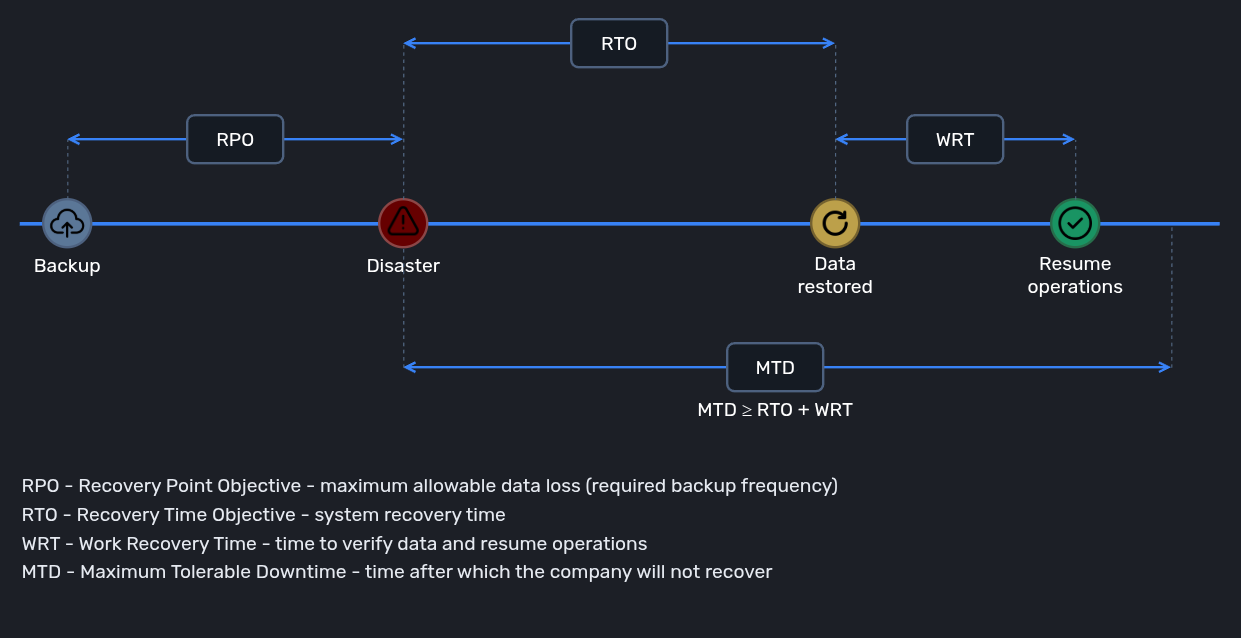
I’d like to point out that all of the above metrics are expected values - accepted by the Business - not the times that came out of a test. The purpose of tests is to verify whether we’re capable of meeting those targets. If not, we need to identify what we can improve (infrastructure, systems, procedures) and work toward a state where we can achieve those goals.
BCP in practice
Let me describe how this works from my own experience. We meet with the business owners of given applications or systems and gather information about them. We then explain what all these metrics mean and ask for initial values (primarily RTO and RPO). The Business usually responds with something like “we can’t lose any data, and if the system is down for an hour it’ll be a disaster and we’ll all die.” Well, every owner thinks their system is the most important one. At that point you usually need to explain that this really applies to emergency situations, that there are often other - more critical - systems, and could they please reconsider whether the unavailability would really be so dramatic. Above all, they should approach this empirically and try to define what the financial consequences would be for each hour or day of downtime, especially when we’re talking about sales applications or CRM.
It then often turns out that once they think it through, that application actually isn’t so critical and they could manage without it for a few days. Of course, they may stick to their original position - either way, some parameters are agreed upon and documented. We (the admins) then check whether we’re technically capable of meeting those requirements. Sometimes the answer is obvious immediately (e.g. we don’t have replication in place, so we can’t achieve 1-minute RPO), sometimes we need to run tests and find out what we can currently deliver. If the tests confirm the targets are met - time to open the champagne. If not - we analyze what can be done to get there. Maybe something needs to be reconfigured, or maybe we need to buy hardware, software, or licenses.
We then go back to the Business with that analysis: we can do this and that to meet your requirements, but it will cost this much. Now there are 3 options:
- The Business gets us the budget for our toys, we implement it and everything lines up,
- The Business doesn’t provide the budget (e.g. because implementation costs significantly exceed potential losses from downtime) and revises its parameters down to realistic targets we can technically deliver,
- The Business doesn’t provide the budget and won’t agree to relax the parameters - a deadlock situation, but ultimately they’re the ones taking on the risk - we can’t conjure up new hardware without money.
Now you have a rough picture of what the BCP analysis process looks like. But what problems are we actually preparing for?
The threat landscape in the context of backups
You might have immediately thought of ransomware. Not without reason - you hear about it everywhere and it’s the most vivid threat imaginable. But is it really the most serious one?
Human error and hardware failures are more dangerous than you think
Ransomware is one of the most severe causes of downtime in terms of consequences, but not always the most frequent. According to the Unitrends 2025 study, the statistically most common cause of data loss is hardware failure (22%), followed by service provider failure (19%), and then human error and ransomware tied at 18% each. I wouldn’t recommend getting too attached to these percentages though, because the variance between studies is quite large - the takeaway is different: no potential cause should be underestimated. An admin error can be just as catastrophic as a hacker attack. The most well-known example of this was the GitLab incident of 2017, where an accidental “rm -rf” left the service unavailable for many hours and caused partial data loss. It’s also an example of another dangerous assumption - “we have a backup, so we’re safe.”
An untested backup is effectively no backup at all
Modern backup systems have plenty of features to verify backup integrity - they compare checksums, run periodic scans, and alert on file system corruption. But we can’t rely solely on automated mechanisms. It often turns out that the problem with backups isn’t even strictly about data corruption, but about “peripheral” issues.
A real-world example: SQL Server databases backed up without the SystemDB. In the event of a serious failure, that means a huge amount of additional, manual work on top of the actual restore. Another case: we were running restore tests for a set of virtual machines and discovered they had trouble mounting an external disk, requiring manual intervention. It turned out this wasn’t a backup issue at all - those machines had never mounted storage properly on boot, it’s just that no one had restarted them for months so the problem never surfaced. The test revealed an entirely separate issue, but that’s precisely its value. Without it, the problem could have appeared at the worst possible moment - instead, it was identified under completely controlled conditions.
Another thing that can lull us into a false sense of security is unrealistic recovery times. In the vast majority of cases described in the aforementioned studies, actual recovery time was significantly longer than the assumed targets. This can mean several things:
- admins use overly optimistic or simplified test assumptions, making results look good on paper but unable to survive contact with reality,
- test results reveal problems, but there are no resources or initiative to fix them,
- some admins simply don’t run tests at all,
- admins encounter unexpected problems with backup infrastructure during outages or attacks, which may indicate inadequate hardening or… insufficiently tested recovery procedures - which brings us back to square one.
Measuring actual recovery times and comparing them against defined targets (such as RTO) is critical, and must be a regular process - one that’s refined with each iteration of testing.
You have a well-secured backup. Are you sure?
The backup system is literally the first thing attackers want to gain access to. Taking control of it essentially means the game is already over. Another option is to take over the infrastructure the system runs on - for example, servers or storage arrays. Either scenario can be devastating. That’s why the backup system and everything associated with it must be like a fortress - isolated, secured, and actively protected. It’s not easy to be an expert in everything, and every admin can overlook something that matters from a security perspective. That’s why solid security audits are so important. I stress - solid, meaning not the kind done just for show to tick a compliance box, but comprehensive reviews carried out by people who really know what they’re doing.
When a security audit was scheduled for a project I was involved in, I was of course aware of some shortcomings that might be flagged. Some of them weren’t within my control. But I wasn’t expecting any critical issues - I had always followed best practices, attended training and conferences, stayed current, and the system was actively managed.
My surprise when I read the report was considerable. The number of things I simply hadn’t thought about was striking. Especially since many of them seemed obvious in hindsight - but only after someone from outside pointed them out. That’s why I think audits are a great thing - you not only improve security, but you learn a lot in the process.
The 3-2-1 rule as a starting point for backup architecture
Many of you have probably heard of the often-cited 3-2-1 backup rule. It states:
- 3 copies of data
- 2 different types of media
- 1 copy in a different location
Interestingly, while this rule sounds like a corporate standard, its origins lie in the book Digital Asset Management for Photographers by photographer Peter Krogh, published in 2005. It was created as a way to protect photos, but its universal applicability quickly brought it into the IT world. Let’s take a closer look.
3 copies of data
There’s an important nuance here. The rule talks about the production data plus two copies (three copies total). We need to remember that the rule was written for photographers, not IT administrators - so in many cases having not two but three backup copies will be not just preferred but actually necessary. The number of backup copies should result from a deliberate, risk-based decision.
2 different types of media
The author highlighted that different media fail in different ways. You should therefore avoid using the same type of media so you don’t end up experiencing a common cause of failure. This principle should be interpreted in a slightly broader context - it’s really about maximum technological independence between copies. Having backups on two servers where one uses SSD and the other HDD does provide some level of separation (SSDs fail differently than HDDs, so they’re unlikely to fail simultaneously), but there are still many similarities (network, operating systems, write method). If a faulty update hits a system that’s identical on both devices, the effect will be the same (unavailability). The separation should be stronger, for example:
- disk array + public cloud
- NAS + LTO tapes
- block storage + object storage.
1 copy in a different location
This seems fairly obvious and natural. One of the backup copies must be in a different place than the primary copy / production data. But here too, different interpretations can arise. Disk arrays in two server rooms in the same building on different floors probably don’t satisfy this rule. What about a building fire or a power outage?
Locations therefore need to be geographically separated as well. By how much? The tempting answer is: it depends - primarily on the results of our BIA analysis and the risks we’ve identified there. Based on those, we should decide on the optimal location for a secondary / backup data center. Many companies have their data centers in the same city and consider that sufficient separation. However, it’s worth noting that while such a setup has its advantages (e.g. the ability to set up dedicated network connections or low latency - very important in certain replication scenarios), it can become problematic in some situations. Consider a blackout. It might seem unlikely, but you don’t need to look far: in Germany at the start of 2026, power lines were deliberately sabotaged, leaving 45,000 households without power for several days. Even the 2015 fire on the Łazienkowski Bridge in Warsaw, which damaged fiber-optic connections of various operators, caused internet problems across many parts of the city. After Russia’s invasion of Ukraine, even the scenario of a missile strike on a city stopped being purely science fiction.
That’s why I believe the minimum separation between locations should be two different cities. Another good option is to use cloud providers, which effectively means your copies can be stored practically anywhere in the world. Cloud infrastructure also has other advantages related to object storage.
Immutability and integrity - extending the 3-2-1 rule
Consider a classic backup architecture - you have either a server packed with disks, or storage resources exposed from an array. You can have a very well-configured and secured central backup server, but if someone gains access and escalates privileges on the host with physical data access - nothing will save you.
The situation changes in your favor when you use object storage - Azure or anything based on S3 (e.g. AWS, Oracle Cloud, etc.). With the right configuration, an attacker won’t be able to delete, encrypt, or reduce the retention of backups even if they have admin access to the backup system, root on the server, or even privileges in the cloud panel itself! This is possible thanks to object lock rules and immutability, as well as the nature of object storage itself - where the OS doesn’t have direct access to data the way it does with block storage, but communicates via API. In this context, it’s worth citing the At-bay 2023 report, which shows that cloud backup architecture provides the highest probability of successful data restoration - 80%, which is roughly 1.5 times better than off-site backup (55%) and on-site backup (56%).
Cloud obviously has its downsides and is not the only option for ensuring immutability. LTO tapes are an equally effective solution (some predicted their imminent demise, yet they remain in widespread use and the technology continues to evolve). There are also many S3-compatible devices available for on-premise use, so you don’t have to hand your data over to a public provider. Interesting options also include solutions like Veeam Hardened Repository - a way to create a secured repository on virtually any hardware.
All of this serves to ensure data immutability, which is critical for our companies (even from a regulatory standpoint - NIS2 requires it). This is also the fulfillment of the extended 3-2-1 rule - namely 3-2-1-1-0. The additions to the “standard” rule are:
- 1 - at least one immutable / air-gapped copy (physically isolated from the network)
- 0 - zero verification errors during restore tests or backup validation mechanisms.
Summary
Modern threats, regulations and the scale of IT dependency mean that asking “do we have a backup?” is no longer enough. A far more relevant question would be: “will we be able to recover data and resume operations within the assumed timeframe, regardless of the scale of the incident?” Unfortunately there are no shortcuts here - to be able to answer yes, you need to seriously address all the topics covered: BIA analysis, BCP and DRP policies, immutability principles, and regular backup testing.
I hope that after reading this article it’s become clear to you that backup is both a technical and a business matter, and these are worlds that are inseparably linked - where a positive outcome is only possible through good cooperation between both sides.
Comments